Reencle logo
Reencle logo

All articles

🔘 Getting to Know Your Reencle Gravity / Gravity Pro — Buttons & ControlsUpdated an hour ago


Overview

4 fixed-function buttons plus a display window on the top panel. The display shows real-time food weight and time elapsed since the last input.


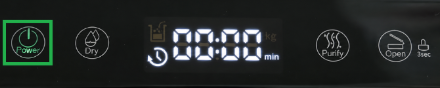
1. Power Button


Function: Turns the unit on/off.

Keep the unit powered on at all times during normal use — the internal heating element keeps microbes active. Powering off drops the internal temperature, sending microbes into a dormant (spore) state and stopping decomposition (odors may develop).


Only power off in unavoidable cases (travel, moving, extended absence). 

See: 👉 Daily Use & Maintenance — Vacation Mode: Preparing for Absence


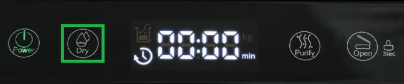
2. Dry Button


Runs a 24-hour drying cycle (auto-off) — fan speed increases significantly and internal temperature rises slightly to reduce moisture.


When to use: Microbes too wet/clumping (confirmed via Squeeze Test).


❗ Supplementary tool, not an instant fix. See: 👉
Microbes — Wet Microbe Recovery Guide


3. Purify Button


Function: Runs a 24-hour enhanced deodorizing cycle (auto-off) when odor is unusually strong. Fan speed increases to accelerate odor removal through the carbon filter.

⚠ Purify is a supplementary tool — it reduces odor but doesn't fix the root cause:


Common Odor Cause

Solution

Microbes too wet or too dry

Correct moisture level. See: 👉 Wet Microbe Recovery Guide

Dirty interior (mesh filter, inner walls, lid)

Clean the interior components

C:N ratio imbalance (excess nitrogen)

Add carbon-rich inputs: bread, finger-sized unbleached paper towel

Acidic/sour smell specifically

Add a small amount of used coffee grounds (note: coffee grounds do not decompose — do not add large quantities)


💡  For detailed guidance, see: 👉 Microbes — Why Do My Microbes Smell?


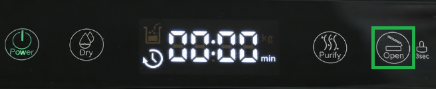
4. Open Button


Function: Auto-opens/closes the small lid.


Press once → lid opens, stays open 7–10 sec (pre-set, not adjustable), then auto-closes. Press again to close early.

⚠️ Never force the lid shut manually during auto-open — this can damage the lid and the cover motor.


The Open button also controls the safety lock (see below).


🔵 Display Window

◻ Food Input Icon & Weight Measurement


  • Opens automatically (foot sensor or Open button) → display switches to kg mode and measures food weight in real time.
  • Recommended: up to 1kg(2.2 lbs)/day. Maximum: 1.5kg(3.3 lbs)/day.
  • Weight is only measured on auto-open of the small lid — manual/large lid opening doesn't trigger it.
  • Reading stays on display for 1 minute after closing, then clears (not saved on the unit).


💡 Gravity Pro only: Wi-Fi-connected units log and accumulate input data (weight + time) in the Reencle app.


💡 Weight is a reference, not the primary guide — always check microbe condition (moist, crumbly texture). Reduce input if clumping or too wet. 

See: 👉 Moisture Check: The Squeeze Test


◻ Time Detection


  • Counts up from 1 minute after the last input, capping at 24:00 until the lid opens again. Resets (not saved) when either lid opens.
  • 💡 Gravity Pro only: Wi-Fi-connected units log time data per session in the app.
  • 💡 Before adding more food, check: 

(1) has the previous batch fully decomposed

(2) is moisture appropriate?


🔒 Lock Feature

Two-level safety lock for households with children/pets or tight installation spaces.

💡 "3sec" on the panel means: hold the Open button 3 seconds to activate the lock — it's not a separate button.


◻ Lock Level 1 — Foot Sensor Disabled

Hold Open for 3 sec → beep + foot sensor light flashes red 3x, then off. Foot sensor no longer opens the lid; Open button still works.


◻ Lock Level 2 — Full Lock (Foot Sensor + Open Button Disabled)

From Level 1, hold Open for 3 more sec → Open button light turns solid red. Both foot sensor and Open button are disabled.


🔓 Unlocking

  • From Level 2: hold Open 3+ sec to cycle back to unlocked.
  • Quick reset (any level): power cycle the unit.


Troubleshooting: Small Lid Won't Open


Indicator

Status

Foot sensor flashing red

Lock Level 1 active — foot sensor disabled

Open button solid red

Lock Level 2 active — full lock


To resolve: Unlock via the Open button or power cycle the unit.

If lock is fully disabled and the lid still doesn't open (button/sensor light turns green but lid stays shut), this may be a hardware issue.


❗ See: 👉 Gravity Troubleshooting: Opening Failure. If unresolved, contact [email protected].


Was this article helpful?
Yes
No