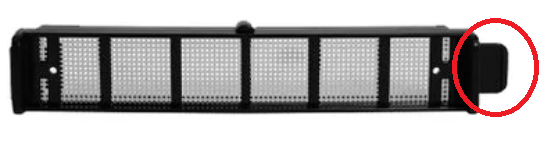
🔵Mesh Filter — Reencle Gravity/Gravity ProUpdated 3 months ago

◻What It Is
A fine mesh screen installed inside the unit.

◻Purpose
Allows air to circulate while preventing microbes and food particles from entering the carbon filter. It also provides a mild deodorizing effect by capturing dust and particles before air passes through the carbon filter.
◻Installation & Removal
Details | |
|---|---|
How to remove | Turn the lever on the front inner wall counterclockwise to release |
How to reinstall | Insert the filter into the correct position, then turn the lever clockwise to lock |
| ⚠️ If the mesh filter is not installed correctly, it may fall into the inner chamber and become damaged. This type of damage is not covered under warranty, regardless of your warranty period, and replacement will require a paid purchase. |
◻Cleaning
Remove, rinse with water, and scrub with a brush when food debris, mold, or microbial dust buildup is visible.
🎬 Video Guide: Cleaning & Reinstalling the Mesh Filter — Gravity ver.
◻Replacement
No replacement cycle unless the filter is damaged or has fallen into the microbe chamber.
⚠️ The Gravity mesh filter is not compatible with the Prime. Always use the filter designated for your model. The Gravity mesh filter has a slightly extended right side (different from the Prime filter) and is secured in place using a small lever — simply rotate the lever to lock or release the filter. |
| ⚠️ If you purchase the wrong filter and wish to return it for a change of mind, the return will be processed as a standard refund with shipping costs deducted from the refund amount. |