🔵Getting to Know Your Reencle Gravity / Gravity Pro — Display Window(Weight Measurement & Time Detection)Updated 3 months ago
🔵 Display Window
◻ Food Input Icon & Weight Measurement

- Opens automatically (foot sensor or Open button) → display switches to kg(lbs) mode and measures food weight in real time.
- Recommended: up to 1kg(2.2 lbs)/day. Maximum: 1.5kg(3.3 lbs)/day.
- Weight is only measured on auto-open of the small lid — manual/large lid opening doesn't trigger it.
- Reading stays on display for 1 minute after closing, then clears (not saved on the unit).
| 💡 Gravity Pro only: Wi-Fi-connected units log and accumulate input data (weight + time) in the Reencle app. |
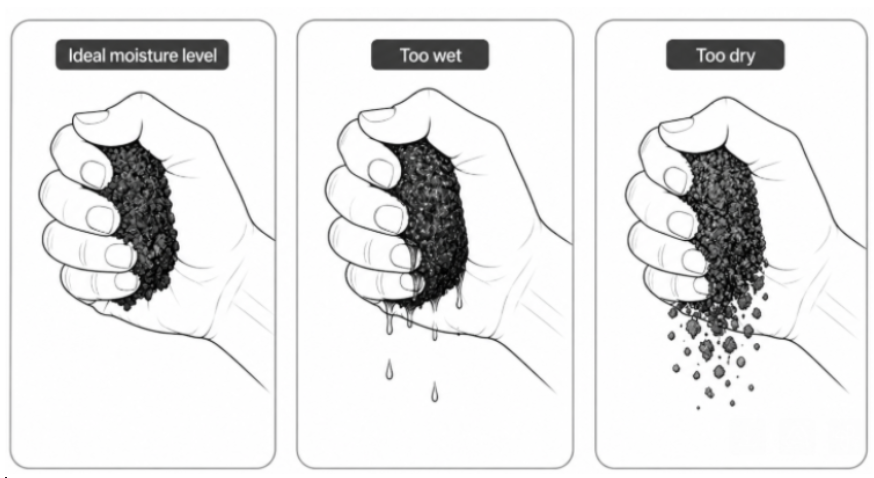
| 💡 Weight is a reference, not the primary guide — always check microbe condition (moist, crumbly texture). Reduce input if clumping or too wet. (Please refer to the "Squeeze Test" below. ⬇) |
◻Time Detection

- Counts up from 1 minute after the last input, capping at 24:00 until the lid opens again. Resets (not saved) when either lid opens.
💡 Gravity Pro only: Wi-Fi-connected units log time data per session in the app. |
💡 Before adding more food, check: (1) has the previous batch fully decomposed (2) is moisture appropriate?(Please refer to the "Squeeze Test") |
◻ How to check moisture levels: the Squeeze Test Take a small handful of the microbe media and squeeze it firmly in your fist. The ideal result: no water drips out, but the material just barely holds its shape. If it crumbles and falls apart completely, it's too dry. If water drips out, it's too wet.
|